
To make the Install as easy as possible here is a quick and short guide that will guide you through. For more thorough information, troubleshooting or just out of curiosity visit the documentation here.
Part 1 – Hardware
1. Get a License
NavicoreCS licenses are available here in the shop. They are lifetime licenses and not subscription based. You are able to install NavicoreCS on 5 devices simultaniously.
2. Register you License
Upon getting your license, navigate to the NavicoreCS Device Manager and click on register. Follow the guide and please under all circumstances remember you password. There is sadly currently no automated way to reset the password, but this is worked on with high pressure.
Upon successful registration, login once more and you are directed to you dashboard.
3. Install on the ESP32
In you dashboard connect the ESP32 via USB cable to you laptop or PC and click install.
Right at the top select the newest version of NavicoreCS to install and click on the first install button. Follow the instruction by selecting your ESP32 (most of the times called UART bridge) in the browser pop up. Upon successful install close the “finished install” pop up and click on registering device right below the install button. Upon successful registration you should be redirected to the main dashboard again.
4. Happy Radio Controlling
Great, you are all setup regarding the Installation! The initial setup will be guided by the setup wizard upon the first time connection to the NavicoreCS WIFI. This process will be explained in the hardware part again.
The main dashboard will show you devices. Here you can also delete them should you want to remove NavicoreCS from a device. The dashboard will also tell you if the software you have currently installed is out of date. Have fun!
Part 2 – Hardware
1. What You Need
- ESP32 development board
- 2x DC motors or ESCs + brushless motors + servo
- battery, LiPo or LiIon (3.0-4.2V)
- GPS module (optional but recommended) not in full use right now, return to home still in development
- Voltage divider resistors (100kΩ + 10kΩ)
- breadboard or soldering equipment
2. Hardware Setup (5 to 15 minutes)
Basic Wiring
ESP32 Pin 16 → Left Motor/ESC
ESP32 Pin 17 → Right Motor/ESC
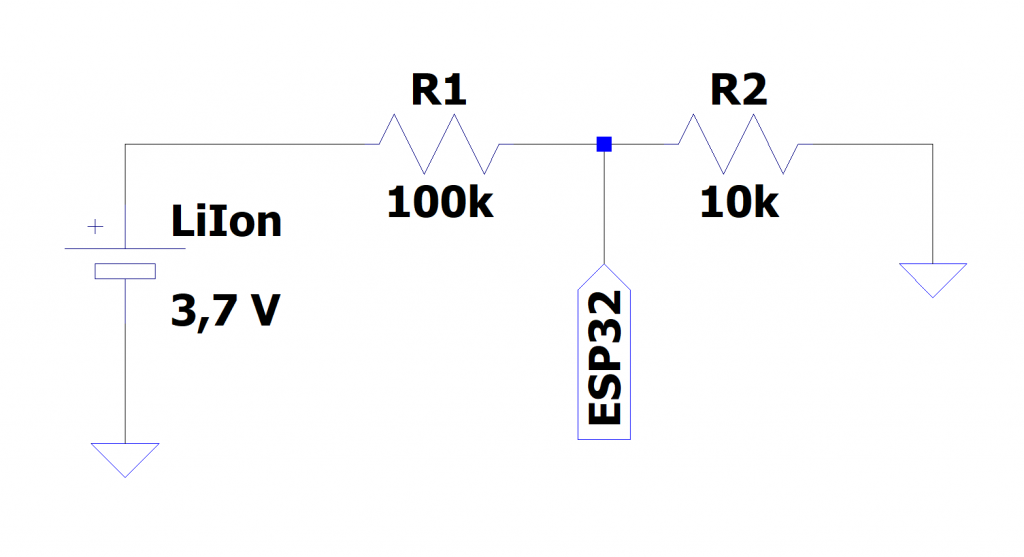
ESP32 Pin 36 → Battery voltage (through voltage divider > see dedicated section)
ESP32 Pin 5 → GPS RX
ESP32 Pin 2 → GPS TX
Voltage Divider for Battery Monitoring
Battery+ → 100kΩ → Pin 36 → 10kΩ → Ground
3. Connect and Configure (3 minutes)
- 1. Connect to WiFi: “NavicoreCS” (default password: “12345678”)
- 2. Automatic redirect to captive portal, alternative: open browser: Go to “navicorecs.local”
- 3. Setup Wizard will open automatically
Configure
- Motor pins (default 16, 17 is fine)
- Motor type (Brushless ✓ for ESCs, leave blank for DC motors)
- Steering mode (Linear for beginners)
- Single/Dual motor (Dual when using two motors and thrust differential for steering > no servo, single motor and servo for steering)
- adjust WiFi name and password to your liking
- Save – device will restart
4. Start Controlling (1 minute)
- Reconnect to your new WiFi network
- Automatic redirect otherwise open browser: “http://navicore.local”
- Use virtual joystick to control:
- Throttle: Up/down on joystick
- Steering: Left/right on joystick
- Monitor telemetry: Battery, GPS, distance, etc.
Quick Tips
For Boats with two motors
- Use Dual Motor mode
- Set steering to Exponential 2 for smoother control
- Adjust Base Throttle if cheap DC motors don’t start at low speeds
For Boats with one Motor or Cars
- Use Single Motor mode
- Pin 16 = Motor, Pin 17 = Servo
- Exponential steering recommended
Safety Features (Automatic)
- Return-to-home after 30 seconds without connection (with GPS) > not released in current version yet > comming soon
- Water detection (Pin4 getting wet, measurement by capactive touch pin)
- Battery monitoring with runtime estimation
Advanced Features and Configuration
Once basic operation works:
Distance training (for GPS-less operation > estimates the distance using a regression curve model that gets trained before hand)
Runtime logging and analysis > click on the small book next to the telemetry to view the log
Custom steering curves > choose your own exponent to your liking